
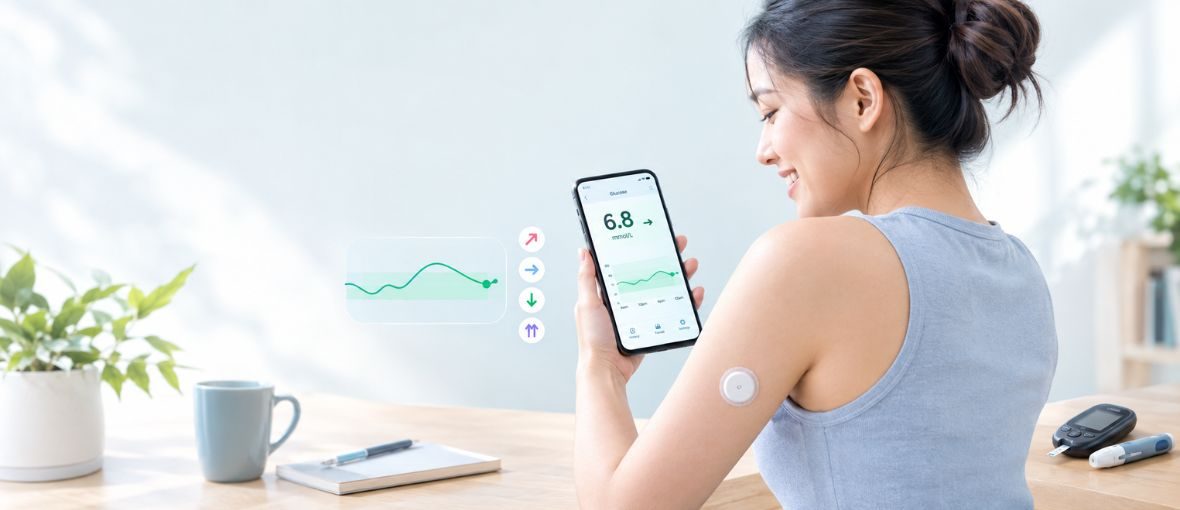
“A CGM can turn individual glucose readings into a clearer picture of your daily glucose patterns.”
Managing blood sugar is an important part of diabetes care. A traditional blood glucose meter can tell you your glucose level at the moment you test, but it does not show what happened before or what may happen next.
A Continuous Glucose Monitor (CGM) works differently. It uses a small sensor worn on the body to measure glucose continuously, helping you see glucose levels, trends, and patterns throughout the day and night.
But how exactly does a CGM work? How is it different from a regular glucometer? And does wearing a CGM mean you never need a finger-prick test again?
Let’s take a closer look.
What Is Continuous Glucose Monitoring?
Continuous Glucose Monitoring (CGM) is a technology that measures glucose levels throughout the day and night using a small sensor placed just under the skin.
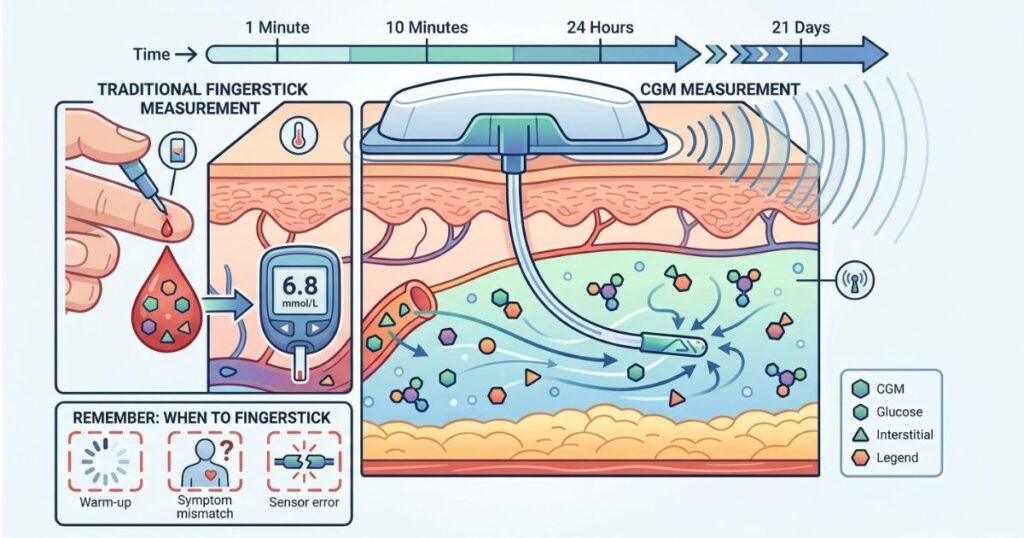
Unlike a traditional glucometer, which measures glucose from a drop of blood obtained through a finger prick, a CGM measures glucose in the interstitial fluid — the fluid surrounding cells beneath the skin.
The sensor sends glucose information to a compatible smartphone, reader, or other display device. Depending on the system, the user may be able to see their current glucose level, glucose trends, historical data, and alerts for high or low glucose.
Because CGM measures interstitial glucose rather than blood glucose directly, its reading can sometimes differ from a fingerstick blood glucose measurement, particularly when glucose levels are changing quickly.
CGM vs. Glucometer: What’s the Difference?
One of the easiest ways to understand CGM is to compare it with a traditional blood glucose meter.
| Feature | Traditional Glucometer | CGM |
| What it measures | Glucose in blood | Glucose in interstitial fluid |
| How it is measured | Finger prick | Small sensor under the skin |
| When you get a reading | When you perform a test | Continuously or at regular intervals, depending on the system |
| Information provided | Glucose level at that moment | Glucose level, trends, and patterns |
| Finger pricks | Usually required | May be greatly reduced, but a blood glucose meter should still be available |
| Alerts | Usually no automatic alerts | Many systems provide high/low alerts |
In simple terms:
A glucometer gives you a snapshot. A CGM gives you a picture of how your glucose is changing over time.
This additional information can help people and healthcare professionals identify patterns that may be difficult to see with occasional fingerstick testing.
How Does a CGM Work?
Although CGM systems differ between models, the basic process is similar.
1. A small sensor is placed under the skin
The sensor is usually inserted using a specialized applicator. The tiny sensing filament sits just beneath the skin and measures glucose in the interstitial fluid.
2. The sensor detects glucose
The sensor converts information about glucose concentration into a signal that can be processed by the CGM system.
3. Glucose data is transmitted
Depending on the device, the information is transmitted automatically or made available when the sensor is scanned or read.
4. You see the information on a display
The data can appear on a smartphone app, dedicated reader, or compatible device.
Many CGM systems also provide trend arrows, which help show whether glucose is rising, falling, or relatively stable.
What Do CGM Trend Arrows Mean?
A CGM doesn’t only tell you your current glucose level. It can also show the direction in which your glucose is moving.
For example:
- → Glucose is relatively stable
- ↑ Glucose is rising
- ↓ Glucose is falling
- ↑↑ or ↓↓ Glucose is changing rapidly
The exact meaning of each arrow depends on the CGM system, so users should always follow the instructions provided with their device.
This trend information is one of the major differences between CGM and a traditional glucometer.
For example, two people could both have a glucose reading of 7.0 mmol/L at one moment. One person’s glucose may be stable, while the others may be rising rapidly after a meal. A CGM can help show this difference.
How Do You Apply and Use a CGM?
The exact application process depends on the device, In general, the process involves:
Step 1: Choose the approved application site
CGM sensors are commonly worn on areas such as the back of the upper arm or abdomen, depending on the specific device.
Only use an approved site for your particular sensor.
Step 2: Prepare the skin
Clean and dry the area site.
Avoid placing the sensor on irritated, damaged, scarred, or otherwise unsuitable skin.
Step 3: Apply the sensor
The sensor is generally inserted using a single-use applicator. The applicator places the small sensing filament beneath the skin while securing the sensor to the skin’s surface.
Step 4: Connect the sensor
Depending on the system, you may need to pair the sensor with a smartphone app, reader, or other compatible device.
Step 5: Allow the sensor to start
Some CGMs require a warm-up period before glucose readings become available. The length of this period varies between devices.
Step 6: Monitor your readings
Once active, the CGM can provide glucose readings and, depending on the system, trend information and alerts.
The sensor also needs to be replaced according to the device. It can be between a 5-21day wear period. Wear time varies between CGM systems, so there is no single replacement schedule that applies to every device.
What Information Can You Get From a CGM?
CGM data can provide much more information than an individual glucose reading.
Current glucose
This shows your glucose level at a particular time.
Trend information
Trend arrows show whether glucose is rising, falling, or relatively stable.
High and low alerts
Many CGMs can alert users when glucose reaches or is predicted to reach a high or low level. The available alerts depend on the specific device.
Glucose patterns
Looking at data over several days can help reveal patterns related to meals, physical activity, sleep, medication, and other factors.
This information can be particularly useful when reviewed together with a healthcare professional.
Understanding Time in Range
One important CGM measurement is Time in Range (TIR).
For many nonpregnant adults with diabetes, the commonly used target range is:
3.9–10.0 mmol/L (70–180 mg/dL)
The 2026 American Diabetes Association Standards of Care state that a goal of more than 70% of time in range is appropriate for many nonpregnant adults using CGM. However, glucose targets should be individualized, particularly for older adults, people at higher risk of hypoglycemia, and other specific populations.
Other useful CGM measurements include:
- Time Below Range (TBR): How much time glucose spends below the target range.
- Time Above Range (TAR): How much time glucose spends above the target range.
- Glucose Management Indicator (GMI): A calculation based on CGM glucose data that approximates an A1C value. It is an estimate and is not necessarily the same as a laboratory A1C result.
- Glucose variability: Describes how much glucose levels fluctuate. A coefficient of variation of 36% or less is commonly used as a clinical target for many adults.
These numbers should not be interpreted in isolation. A healthcare professional can help determine what targets are appropriate for each person.
Does a CGM Replace a Glucometer?
Not necessarily.
Even when using a CGM, people with diabetes should have access to a blood glucose meter.
A fingerstick blood glucose test may still be needed when:
- The CGM is warming up or unavailable.
- The sensor stops working or loses communication.
- A warning or error message appears.
- The CGM reading does not seem to match how you feel.
- The healthcare professional recommends confirming a reading.
- Glucose is changing very rapidly and the CGM reading may temporarily differ from blood glucose.
The 2026 ADA Standards of Care specifically recommend that people using CGM also have access to blood glucose monitoring when needed.
For example, if a person feels symptoms of hypoglycemia but the CGM reading does not seem consistent with those symptoms, they should follow their device instructions and healthcare plan, which may include checking blood glucose with a meter.
Why Can CGM and Fingerstick Readings Be Different?
This is a common question.
A glucometer measures glucose in blood, while a CGM measures glucose in interstitial fluid.
Because glucose moves from the bloodstream into the interstitial fluid, the two measurements may not always match exactly. The difference can become more noticeable when glucose levels are changing quickly, such as after eating, exercising, or treating low blood glucose.
A small difference does not automatically mean that the CGM is malfunctioning.
Can Anything Affect CGM Accuracy?
Yes. CGM readings can be affected by several factors.
These may include:
- Rapid changes in glucose
- Problems with sensor placement or adhesion
- Pressure on the sensor
- Sensor errors or damage
- Certain medications or substances, depending on the CGM system
- Skin irritation or allergic reactions
- Other factors specific to the device
Because interfering substances vary between CGM products, it is important to check the instructions for your specific device and tell your healthcare professional about medicines or supplements you are taking.
The 2026 ADA Standards of Care also recommend educating CGM users about potential interfering substances and other factors that may affect accuracy.
What Are the Benefits of Using a CGM?
For people who are appropriate candidates, CGM can provide several advantages:
Better visibility of glucose patterns
Instead of seeing glucose only when you perform a test, CGM can help show how glucose changes throughout the day and night.
Earlier awareness of highs and lows
Depending on the device, alerts can notify users when glucose is too high, too low, or moving toward a preset threshold.
More information for diabetes management
CGM data can help people and healthcare professionals understand patterns and make informed decisions about diabetes management.
Less reliance on frequent fingersticks
Many CGMs can reduce the need for routine fingerstick testing, although a blood glucose meter should still be available when needed.
Who Can Benefit From CGM?
CGM is an important tool in diabetes care, particularly for people using insulin.
The 2026 ADA Standards of Care recommend CGM for people with diabetes who use insulin and also support CGM use for people using non-insulin treatments that can cause hypoglycemia, as well as other situations where CGM can help with diabetes management. The choice of device should be individualized according to the person’s needs, preferences, circumstances, and ability to use the technology.
CGM technology is also becoming available for people who do not use insulin and for some people without diabetes. However, whether CGM is appropriate depends on the individual’s health goals, medical situation, and the specific device.
If you are considering a CGM, speak with a healthcare professional about whether it is suitable for you.
Common CGM Problems
CGMs can be very useful, but they are not completely problem-free.
Skin irritation
Some people develop redness, itching, or irritation from the adhesive. If a skin reaction is persistent or severe, seek advice from a healthcare professional.
Sensor falling off
Sweating, swimming, friction, or accidental impact can affect sensor adhesion. Follow the manufacturer’s recommendations for keeping the sensor secure.
Alarm fatigue
Frequent alerts can become frustrating or distracting. Alert settings should be discussed with a healthcare professional so that they remain useful without creating unnecessary stress.
Technical problems
Bluetooth or connectivity issues, app problems, sensor errors, or other technical issues can temporarily interrupt glucose data.
Always keep a backup blood glucose meter available.
What Should You Remember About CGM?
A CGM does more than tell you your glucose number.
It can help show:
Where your glucose is now → where it is going → and how it changes over time.
However, CGM is a tool, not a replacement for professional diabetes care.
The most useful approach is to combine CGM information with appropriate treatment, healthy lifestyle habits, regular follow-up, and guidance from your healthcare professional.
If you use a CGM, learn how your specific device works, understand its alerts and limitations, and keep a blood glucose meter available for situations where a fingerstick check is needed.
Frequently Asked Questions
- Does wearing a CGM hurt?
CGM sensors use a small filament placed just beneath the skin. Some people feel a brief pinch or discomfort during application, while others feel very little.
- How long does a CGM sensor last?
This depends on the specific CGM system. Sensor wear time varies between products, between 5-21days depending on models.
- Can I shower or swim while wearing a CGM?
Some CGM systems are water-resistant, but the permitted depth and duration vary by device. Check the instructions for your specific sensor before swimming or prolonged water exposure.
- Can I sleep while wearing a CGM?
Yes. CGMs are designed to be worn continuously according to their approved wear instructions. Many people use them overnight to monitor glucose while sleeping.
- Does CGM completely replace finger-prick testing?
No. A blood glucose meter should still be available. Fingerstick testing may be needed when the CGM is unavailable, during warm-up, when there is an error, or when the reading does not match your symptoms.